Kategoriearchiv: English

My Debian Initiation

Having switched from Ubuntu to Debian Squeeze and pondering ways to combine the security of a largely stable operating system with the additional functionality afforded by individual newer software packages, I recently wondered: Apt pinning seems complicated, why not just add testing sources to sources.list and use apt-get -t testing to get whatever newer packages I need? I can now answer this question for myself: because if you are under the impression that upgrade tools like apt-get and Synaptic are aware of the “current distribution” and will never upgrade beyond that unless explicitly told so, then that impression is wrong, even if apt-get’s occasional “keeping back” packages and the name of the command to override this (dist-upgrade) may suggest it. You will thus inadvertently upgrade your whole system to a non-stable branch. And when you finally notice it, you will then, more out of a desire for purity than out of actual concern for your system’s security, use Apt pinning to try and perform a downgrade. The downgrade will fail halfway through because the pre-remove script for something as obscure as openoffice.org-filter-binfilter has an obscure problem, leaving you with a crippled system and without even Internet access to try and get information on how to resolve the issue. By this point, reinstalling from scratch seems more fun than any other option. And so I did.

Another lesson learned: Do use the first DVD to install Debian, it contains a whole lot of very useful things such as network-manager-gnome or synaptic that are not included with the CD and that are a hassle to install one by one. And there’s also a new unanswered question: why did the i386 DVD install an amd64 kernel?

Unicode Man

Holy shit, this is awesome:

<deep portentous voice used for film trailers>When the fight for internationalisation hots up, mild mannered web developer Martin Sammtleben becomes Unicode Man, defender of diacritics, champion of challenging codepoints. Faced with an ASCII-fixated enemy, Unicode Man must free the badly programmed text engines of the world of their inability to implement international standards before all are assimilated by their failure to put the right glyph in the right place</deep portentous voice used for film trailers>

Highbrow Java

Here’s examples from my actual code of five lesser-known Java features, in increasing order of how much fun I had discovering they exist.

Anonymous classes

These are fairly well-known, so let’s go for a freaky example – an anonymous class declaration within the head of a (labeled!) for loop:

sentence : for (List children :
        node.getOrderedChildrenBySpan(
        sentence.getOrderedTerminals(), new Test() {

	@Override
	public boolean test(Node object) {
		return false;
	}

})) {
	for (Node child : children) {
		String tag = child.getLabel().getTag();

		if (tag.contains("-SBJ")) {
			break sentence;
		}

		tags.add(PTBUtil.pureTag(child));
	}
}

Enums

Boring, I know. I’m mentioning them here for completeness because I found out about them rather late and was like, hey, cool, that’s much nicer and cleaner than working with explicit integer constants.

public enum EditOperationType {

	DELETE, INSERT, SWAP, MATCH;

	@Override
	public String toString() {
		switch(this) {
		case DELETE:
			return "delete";
		case INSERT:
			return "insert";
		case SWAP:
			return "swap";
		default:
			return "match";
		}
	}

}

Generic methods

Luckily, the following code is no longer live.

@SuppressWarnings("unchecked")
public  T retrieve(
        Class type, int id) {
    return (T) getStoreForType(type).retrieve(id);
}}

Instance initializers

I know I discovered these once thinking I needed a constructor in an anonymous class and wondering how to do this, because how would one declare a constructor in a class without a name? It did not remain in my workspace, however, and I never used an instance initializer again. In the case of anonymous classes, I tend to use final variables outside of the anonymous class, or derive them from classes whose constructors already handle everything I need. So I’m pulling an example from someone else’s code:

_result = new ContainerBlock() {
    {
        setPanel(_panel);
        setLayout(LayoutFactory.getInstance()
                .getReentrancyLayout());
        addChild(unboundVarLabel);
    }
};

Multiple type bounds

public abstract class IncrementalComparator<
        T extends HasSize & HasID> {
    // ...
}

I wonder what’s next.

Ezri Dax

I’m a huge fan of Ezri Dax because she is the only character in Star Trek: Deep Space Nine who consistently stands up to Klingon crap. Observe:

EZRI: Stop it.
WORF: A Klingon would rather die than be held captive!
EZRI: What are you going to do? Kill yourself and leave me here alone?
WORF: This is no time for your jokes!
EZRI: It’s no time for Klingon chest-thumping either.
(’Til Death Us Do Part)

WORF: Now, tell me what you think.
EZRI: Okay. But I’m not sure you’re going to like it.
WORF: Tell me.
EZRI: I think that the situation with Gowron is a symptom of a bigger problem. The Klingon Empire is dying. And I think it deserves to die.
WORF: You are right. I do not like it.
EZRI: Don’t get me wrong, I’m very touched that you still consider me to be a member of the House of Martok, but I tend to look at the Empire with a little more scepticism than Curzon or Jadzia did. I see a society that is in deep denial about itself. We’re talking about a warrior culture that prides itself on maintaining centuries old traditions of honour and integrity, but in reality it’s willing to accept corruption at the highest levels.
WORF: You are overstating your case.
EZRI: Am I? Who was the last leader of the High Council that you respected? Has there even been one? And how many times have you had to cover up the crimes of Klingon leaders because you were told it was for the good of the Empire? I know this sounds harsh, but the truth is, you have been willing to accept a government that you know is corrupt. Gowron’s just the latest example. Worf, you are the most honourable and decent man I’ve ever met, and if you’re willing to tolerate men like Gowron, then what hope is there for the Empire?
(Tacking into the Wind)

Also, she hates gagh.

Developments in Desktop Environments, Part 2: The Glorious Future

Yesterday I looked at recent trends in the development of computer desktop environments and noted that the traditional desktop (+ windows + panels + menus) metaphor is being abandoned in favor of a simpler “one thing is on screen at a time” policy as already used in the graphical user interfaces of mobile devices. Like the developers of Mac OS X and GNOME Shell, I too think that the traditional desktop metaphor must die, but I want something completely different to replace it. Here’s some guidelines that should, in my opinion, be followed, to create next-generation desktop environments:

“Navigational” elements like application launchers and overviews over active applications have no business being full-screen monsters by default, as is the case with Mission Control in Mac OS X or with the Activities view in GNOME Shell. There’s nothing wrong with traditional panels and menus. Make them as lean as possible while staying intuitive. I think Windows (with the task bar in Windows 7) and Ubuntu (with the launcher in Unity) are on the right track by adopting the design pioneered by Mac OS X’s dock: frequently used and currently open applications are in the same place. This may first seem dubious conceptually, but it makes more and more sense as applications are becoming more and more state-persisting.

No desktop! When the traditional desktop metaphor dies, make sure the desktop dies with it. Sadly, no major desktop environment seems to be tackling this. The desktop is sort of like a window, but can only be shown by moving all windows out of the way. It lacks a clearly defined purpose and tends to clutter up one way or the other. Get rid of it!

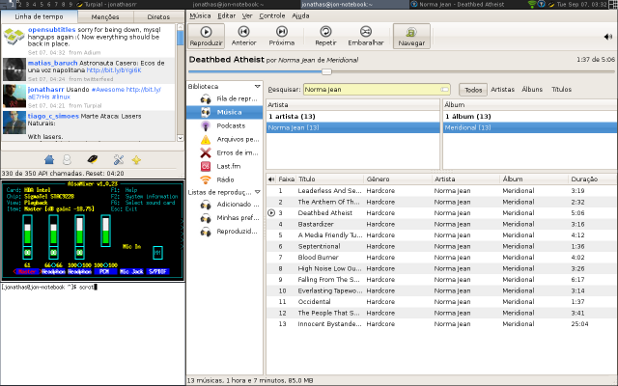
Go tiling! Now that there’s no desktop before which windows can float, windows should float no more. What overstrains users’ (read: my) minds is not more than one window visible at a time. On the contrary, there are many tasks that require working with two applications simultaneously. What annoys users (read: me) is having to arrange windows themselves. Full-screen is a nice feature that moves and resizes one window so that it occupies the whole available screen space. I want that for two or more windows! They should always be arranged automatically to use the screen space optimally. The answer to this plea is tiling window managers, here’s one in action:

A tiling window manager with four windows open and one panel (screenshot by Jonathas Rodrigues)

Current tiling window managers are for technical users willing to do quite some configuration before it works, do a hell of a lot of configuration before everything works nicely, and memorize a lot of keyboard commands. So far all of this has been putting me off going tiling. There is no reason why it should stay that way. Complex GUIs like those of Photoshop or Eclipse already consist of multiple “subwindows” called views that can be rearranged, docked, undocked, grouped etc. freely using the mouse. The same principle could be applied to the whole desktop, for example in a Linux distribution that makes sure there’s a decent set of standard configuration settings, and that special things like indicator applets and input methods work as we’re used to from the traditional GNOME desktop. Monbuntu, anyone?

Developments in Desktop Environments, Part 1: The Awkward Present

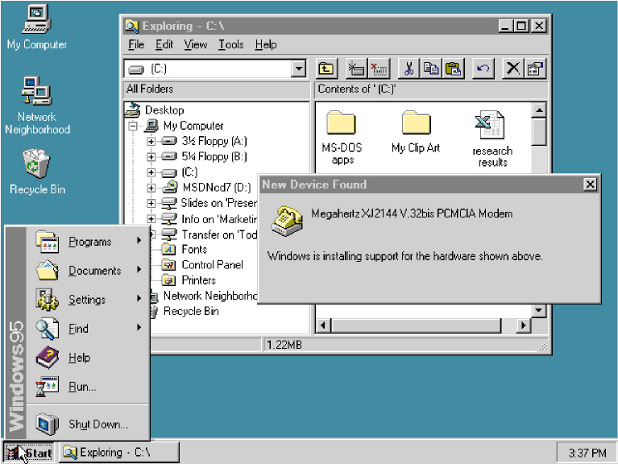
Once upon a time, when computer operating systems learned to multi-task, their basic user interfaces started to reflect this ability: applications now ran simultaneously in a number of windows that could be freely opened, closed, moved around and resized on the screen. This was (an important aspect of what is) called “the desktop metaphor”.

Windows 95 with two open windows, task bar and start menu (screenshot by Microsoft)

Always-visible gadgets like “task bars”, “docks” and “menu bars” were introduced for basic tasks like managing open windows and opening new ones.

It took for the advent of super-user-friendly mobile devices (limited multitasking ability, limited screen space) for developers to notice that unlike modern desktop computers, people aren’t actually very good at multitasking. At least for the tasks they do with mobile devices, people are perfectly happy with only having one window, or menu, open at a time.

The new Mac OS X Launchpad (screenshot by Apple)

This trend is now coming to the desktop computer. Apple recently announced a new release of Mac OS X, explicitly stating that many of the new features are inspired by the iPhone and the iPad. The most striking one is Launchpad. It is nothing more than a menu of all available applications, but one that takes up the whole screen. Together with Dashboard and Exposé (now called Mission Control), that’s quite a long list of special-purpose full-screen gadgets taking over window managing/application launching functions traditionally fulfilled by task bars etc. And together with Mac OS X’s new full-screen apps (not quite your traditional maximized windows), it quite clearly marks a turn toward a one-window-is-visible-at-a-time principle.

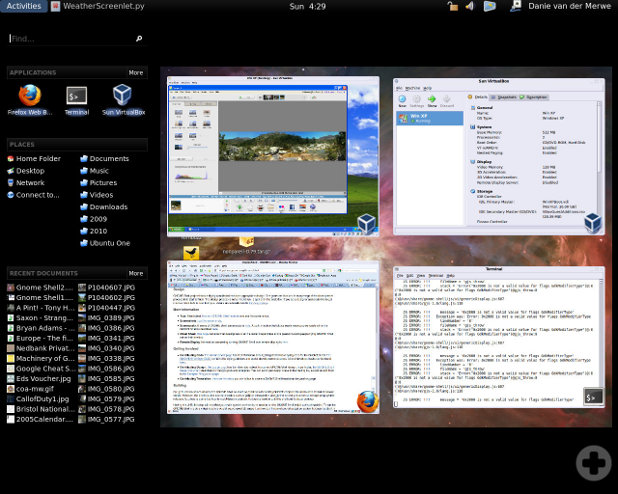
The Activities view of GNOME Shell (screenshot by DanieVDM)

A similar thing is going on in GNOME Shell. They are cramming everything for which there used to be panels and menus into one full-screen view called Activities, including Exposé-like overviews of the desktop(s). If the multitude of full-screen gadgets in Mac OS X seems confusing, the GNOME approach of cramming so many things into one full-screen view seems bizarre. If upon clicking a button with the ultimate goal of, say, firing up the calculator, the contents of the whole screen change and hide my currently open windows, I consider this a high price to pay. In return, there should at least be a gain in focus, as with the Mac OS X gadgets, each of which shows more or less one kind of thing only.

So what is a desktop environment developer to do if she really wants to advance the state of the art instead of just haphazardly introducing new misfeatures (or taking it slow with moving away from the traditional desktop metaphor, as Microsoft does)? Is there a happy medium between overview and focus? Bear with me for Part 2: The Glorious Future.

Tags Suck

I feel a little schadenfreude about the potential demise of Delicious. Not for popularizing social bookmarking, I like that a lot. What I resent them for is popularizing tags. Tags since infest services like Flickr, many blogs and Mendeley. If you listen to their advocates, you will be told that tags are one of the cornerstones of the Web 2.0, and even more so of the coming Web 3.0. To me, it seems that tags are an essentially useless technology that has somehow managed to become a remarkably long-living fad.

Sure, you can tag things (webpages, videos, books, research papers…) with keywords descriptive of their content. That is a 20th century librarian’s approach to making sure stuff can be easily retrieved. We live in the age of fulltext search, machine translation and the AwesomeBar (I myself stopped using Delicious the very moment Firefox 3 came out), at the dawn of semantic search and object-class detection in images. A Web service that relies on users sitting down and tagging stuff must be failing to use and further develop this technological potential.

So as long as you just want to retrieve stuff from a big bag of documents, search is your friend and tagging is slave labor. But what, the song of praise for tags goes on, if you want to order things, to structure them, to gain a deeper understanding of their relations and to improve your overview over the knowledge they represent? For this purpose, I hear, 20th century people used folders and put everything into a tree structure. The 21st century digital native social media Übermensch, on the other hand, uses tags. The obvious reason is that folders are so one-dimensional and rigid and you can classify things by only one dimension (or you have to first classify them by what to classify them by). Ordering schemes for pre-enlightened world views, those trees! The earth is a disc and built around heavenly Jerusalem, and everything has its one place and purpose, that’s the kind of insight that fits in folders, isn’t it?

I beg to differ. The “ordering schemes” you get by tagging stuff are aptly depicted by one of the most popular visualizations for tags: a cloud. A vapor. Nothing the human mind can really make sense of. Nothing that represents relations or insights. The only structured views on this cloud are filters, showing all items bearing a certain tag or combination of tags. Lists which are in no visible relation to each other. Venn bubbles bubbling around in the cloud. An excessively primitive database that does little more than a search engine but involves a hell of a lot more tedious human work. Concerning the collective knowledge aspect of this work, here’s what: in the time it would take you to tag a collection of bookmarks concerning a topic, rather write a blog article or a new paragraph for a Wikipedia article and let Google’s algorithms do the keyword extraction part for you. I’m sure you’re doing humanity a greater favor this way.

What you get by carefully organizing things into a tree structure, on the other hand, really is an ordering scheme. In the process, you weigh dimensions, you pick one as the one to order by, and discard other dimensions that are less useful for organizing your knowledge, honoring the fact that unlearning is an important part of learning. You think hard about things in order to find the best ordering scheme. Often you will find that there is no single dimension by which all things can usefully be ordered, and you will split them up into collections in each of which a different dimension is more relevant. These splits will likely be driven by your needs for your current project, and your information bookkeeping becomes goal-oriented. And isn’t this what dealing with the stuff and organizing it is all about: learning something from it so you can do something with it? And with the way the human mind works, I claim boldly, you haven’t really “got” something (information doesn’t turn into knowledge) until you have succeeded in putting it into a tree shape. Folders rock.
LaTeX, PSTricks, pdfTeX and Kile

Many people writing scientific documents in TeX know the problem: on one hand, you want to use the more modern pdfTeX rather than LaTeX, for example because of the hyperref package or because you want to include pdf, png or jpg images. On the other hand, pdfTeX fails to produce figures that make use of PostScript, as is the case when using the very useful PSTricks. There are a number of possible ways around this problem. What is working well for me right now is a solution kindly provided by Wolfgang. Create PSTricks figures as separate documents using the following skeleton:

\documentclass{article}
\usepackage{pstricks}
\pagestyle{empty}
\begin{document}
% your graphics here
\end{document}

Then autocrop the document and save it as a PDF file using the following shell script:

#!/bin/sh

latex $1.tex
dvips $1.dvi
ps2eps -l --nohires -f $1.ps
ps2pdf -dEPSCrop -dAutoRotatePages=/None -dUseFlateCompression=true $1.eps

Then you can include the graphics (in PDF format) from your main document, which you build using pdfTeX.

Since I use Kile for writing in TeX, I replaced the shell script with a build tool which I called IlluTeX. It amounts to the following additions in ~/.kde/share/config/kilerc:

[Tool/IlluTeX/Default]
autoRun=no
checkForRoot=no
class=Sequence
close=no
jumpToFirstError=no
menu=Compile
sequence=LaTeX,DVItoPS,PStoEPS,PStoPDFEPSCrop,ViewPDF
state=Editor
to=pdf
type=Sequence

[Tool/PStoEPS/Default]
class=Convert
close=no
command=ps2eps
from=ps
menu=Compile
options=-l --nohires -f '%S.ps'
state=Editor
to=eps
type=Process

[Tool/PStoPDFEPSCrop/Default]
class=Convert
close=no
command=ps2pdf
from=eps
menu=Compile
options=-dEPSCrop -dAutoRotatePages=/None -dUseFlateCompression=true '%S.eps' '%S.pdf'
state=Editor
to=pdf
type=Process